VS Code Extension
Prerequisites:
- VS Code version 1.87 or higher
- Python 3.10+ (for Skylos CLI)
- OpenAI or Anthropic API key only for LLM fix generation
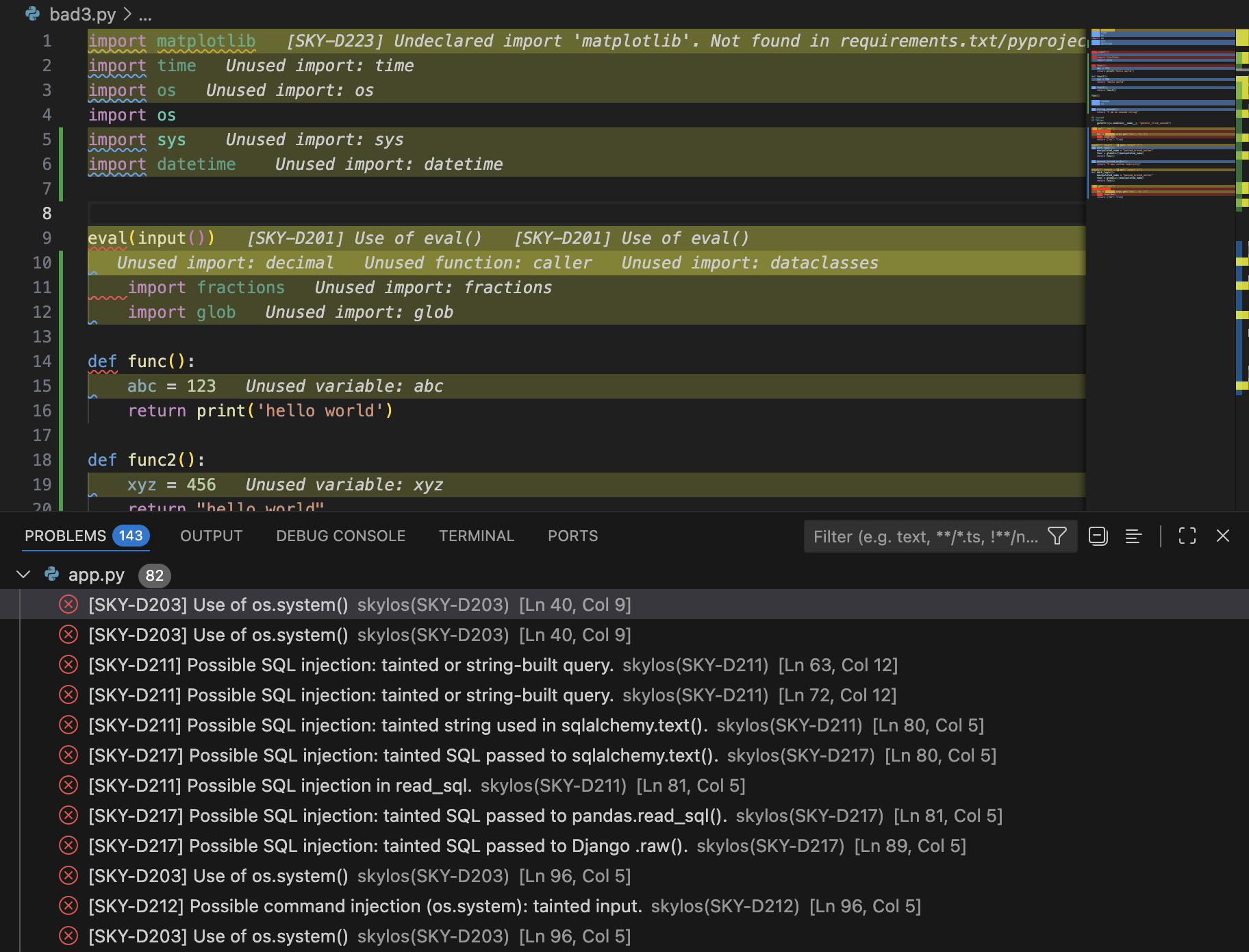
The Skylos VS Code extension brings real-time bug detection to your editor. It combines static analysis from the Skylos CLI with local in-loop verification for changed code and optional LLM-powered fixes.
Installation
1. Install the extension
Search for "Skylos" in the VS Code marketplace, or install directly:
VS Code:
ext install oha.skylos-vscode-extension
2. Install the Skylos CLI
The extension uses the Skylos CLI for static analysis. Install it with pip:
pip:
pip install skylos
Verify the installation:
bash:
skylos --version
3. Add your API key for fixes
The realtime verifier runs through the local skylos verify command. Add an OpenAI or Anthropic API key only if you want the extension to generate fixes:
- Open VS Code Settings (
Cmd + ,on Mac,Ctrl + ,on Windows) - Search for
skylos - Add your API key to
skylos.openaiApiKeyorskylos.anthropicApiKey
settings.json:
{
  "skylos.openaiApiKey": "sk-...",
  "skylos.aiProvider": "openai"
}
How It Works
The extension provides two layers of protection:
Layer 1: Skylos CLI (on save)
When you save a Python file, the Skylos CLI runs and detects:
- Dead code (unused functions, imports, classes, variables)
- Hardcoded secrets and API keys
- Dangerous patterns (
eval,pickle,shell=True)
Layer 2: Verify Watcher (on idle)
When you stop typing, the extension sends the unsaved buffer to skylos verify
through stdin and scopes the result to the changed function range. The verifier
returns machine-readable AI-code trust findings, including:
- hallucinated references and missing helpers
- unfinished generated code
- stale references after refactors
- disabled security controls
- API/dependency hallucinations, assertion weakening, and diff-aware AI-defect signals, reported under
ai_defects
Features
Real-time Analysis
The verify watcher only analyzes functions that have changed, using content hashing to skip unchanged code. Results are cached for 60 seconds, and the extension logs the exact local command in the Skylos output channel.
CodeLens Buttons
When the AI finds an issue, clickable buttons appear above the error line:
- Fix with AI — Generates a fix and shows a diff preview
- Dismiss — Removes the diagnostic without adding a pragma comment
Streaming Fixes
When you click "Fix with AI", the extension streams the response from the LLM. You'll see progress in the status bar:
Status bar:
$(sync~spin) Fixing... 234 chars
Diff Preview
Before applying any fix, you'll see a side-by-side diff comparing your original code with the AI's suggestion. Click "Apply" to accept or "Cancel" to reject.
Configuration
All settings are under the skylos.* namespace:
| Setting | Default | Description |
|---|---|---|
skylos.path | "skylos" | Path to the Skylos CLI executable |
skylos.aiProvider | "openai" | AI provider: "openai" or "anthropic" |
skylos.openaiApiKey | "" | Your OpenAI API key |
skylos.anthropicApiKey | "" | Your Anthropic API key |
skylos.openaiModel | "gpt-4o-mini" | OpenAI model for analysis |
skylos.anthropicModel | "claude-sonnet-4-20250514" | Anthropic model for analysis |
skylos.idleMs | 2000 | Milliseconds to wait after typing stops |
skylos.popupCooldownMs | 15000 | Cooldown between popup alerts |
skylos.runOnSave | true | Run Skylos CLI when saving |
skylos.enableSecrets | true | Scan for hardcoded secrets |
skylos.enableDanger | true | Flag dangerous code patterns |
skylos.enableQuality | true | Include code quality checks |
skylos.confidence | 60 | Confidence threshold (0-100) |
skylos.excludeFolders | ["venv", ".venv", "build", "dist", ".git", "__pycache__"] | Folders to exclude |
Using Claude instead of GPT
To use Anthropic's Claude:
settings.json:
{
  "skylos.aiProvider": "anthropic",
  "skylos.anthropicApiKey": "sk-ant-...",
  "skylos.anthropicModel": "claude-sonnet-4-20250514"
}
Adjusting sensitivity
If the AI is too noisy, increase the idle time:
settings.json:
{
  "skylos.idleMs": 5000,
  "skylos.popupCooldownMs": 30000
}
Commands
| Command | Description |
|---|---|
Skylos: Scan Workspace | Manually trigger a full scan |
Skylos: Fix Issue | Fix the issue at cursor with AI |
Access commands via the Command Palette (Cmd + Shift + P).
Quick Fix Menu
When you see a squiggly line, click the lightbulb or press Cmd + . to see quick fix options:
- Skylos: ignore on this line — Adds
# pragma: no skyloscomment
Output Panel
View detailed scan results in the Output panel:
- Open Output (
Ctrl + Shift + U) - Select "skylos" from the dropdown
The output shows all findings grouped by category and severity:
Output:
============================================================
DETAILED RESULTS
============================================================

SECURITY
------------------------------------------------------------

  HIGH (1)
 1. [DANGER-001] Use of eval() with user input
    File: app/utils.py:42

DEAD CODE
------------------------------------------------------------

  INFO (3)
 1. Unused import: os
    File: app/main.py:2
 2. Unused function: deprecated_handler
    File: app/views.py:89
 3. Unused variable: temp
    File: app/models.py:156

============================================================
Total: 4 issue(s)
Troubleshooting
Issue: "Skylos failed: command not found"
The Skylos CLI is not installed or not in your PATH.
Solution:
- Install the CLI:
pip install skylos - Or set the full path in settings:
"skylos.path": "/path/to/skylos"
Issue: AI features not working
Check that you've added your API key:
- Open Settings (
Cmd + ,) - Search for
skylos.openaiApiKeyorskylos.anthropicApiKey - Paste your API key
Also verify skylos.aiProvider matches your key type.
Issue: No popups appearing
Popups only appear for error severity issues (not warnings). They also have a cooldown (default 15 seconds) and won't show the same issue twice.
To see all issues, check the Problems panel (Cmd + Shift + M) or the Output panel.
Issue: Python version errors with Skylos CLI
Skylos requires Python 3.10+. Check your version:
python --version
If you're on an older version, upgrade Python or use a virtual environment with 3.10+.
Issue: "TypeError: unsupported operand type(s) for |"
This happens when running Skylos with Python 3.9 or earlier. The | type union syntax requires Python 3.10+.
Solution: Upgrade to Python 3.10 or higher.
Privacy
- Skylos CLI runs 100% locally — no network calls
- Realtime verify uses
skylos verifylocally and does not send code to an LLM provider - Fix with AI sends only the code needed for the selected fix to OpenAI/Anthropic
- Your API keys are stored in VS Code settings (local to your machine)
- No telemetry or analytics are collected
Feedback
Found a bug or have a feature request?
- GitHub Issues
- Use the thumbs down button in VS Code to report problems