Tutorial: from setup to a checked pull request
You use two commands. Your coding agent runs everything else itself.
| When | You run | What you get |
|---|---|---|
| Once per repository | skylos setup | Claude Code and Codex know the Skylos steps, the PR check is written, the code is mapped |
| Every day | skylos open | One page: the diagram of your code, what changed in plain English and what it affects, and every check run |
This tutorial follows one real session on a small shop repository: a real Claude Code run describes the code, makes a change, gets blocked and fixes it. Every screenshot and output below comes from that session.
Everything here runs on your computer. Nothing is uploaded, and the diagram, the change verdicts and the checks use no model and no key.
0. Install
Install Skylos into the environment your project's tests run in, so
skylos done can run them:
source .venv/bin/activate      # the environment your tests use
pip install -U skylos
which skylos                   # should be .venv/bin/skylos
If which -a skylos lists another skylos first (for example an old Homebrew
install), your coding agent may start that one. skylos setup warns you when
this happens.
1. Set up the repository once
skylos setup
Skylos is set up in shop

  ✓ Coding agents  CLAUDE.md, AGENTS.md: Skylos steps added
  ✓ Claude Code    .mcp.json: Skylos tools connected (Claude Code asks you to approve them once)
  ✓ Codex          Skylos tools connected (in your Codex settings)
  ✓ PR check       .github/workflows/skylos.yml: scans changed lines and runs your tests on every pull request
  ✓ Code map       22 functions and classes in 12 files, 6 areas; 0 described in plain English

Next
  skylos open   the map of your code, what changed and every check, in one page
  Commit CLAUDE.md, .github/workflows/skylos.yml, .mcp.json, .skylos/graph/.gitignore, AGENTS.md so your team and CI get them.
  For plain-English descriptions, ask your coding agent: "describe the code with Skylos".
What each line did:
- Coding agents: added a short Skylos block to
CLAUDE.md(Claude Code) andAGENTS.md(Codex and others) betweenskylos:startandskylos:endmarkers. It tells the agent to look up what it is about to change, runskylos donewhen it finishes, explain the change for reviewers, and describe new code. The rest of each file is left alone. - Claude Code: added the Skylos tools to
.mcp.json. Claude Code asks you to approve them the first time. - Codex: ran
codex mcp add skylos. - PR check: wrote the GitHub Actions workflow (other CIs get the block to add). It runs the same checks on every pull request.
- Code map: built
.skylos/graph/.
Commit the files it lists. Running skylos setup again only changes what is
missing or out of date.
2. Let your agent describe the code
Ask your coding agent:
Describe the code with Skylos.
The agent asks Skylos which functions and classes have no description, writes
one sentence for each and saves them. In this session Claude Code described
all 22 in five turns. It used the existing Claude Code subscription, and
Skylos never saw a key. Commit .skylos/graph/notes.json so your team sees
the same descriptions.
You can also run skylos graph describe with your own model key.
3. Open the page
skylos open
It compares your branch with the branch pull requests merge into
(origin/HEAD, else main or master) and opens one local page. Only your
computer can reach it.
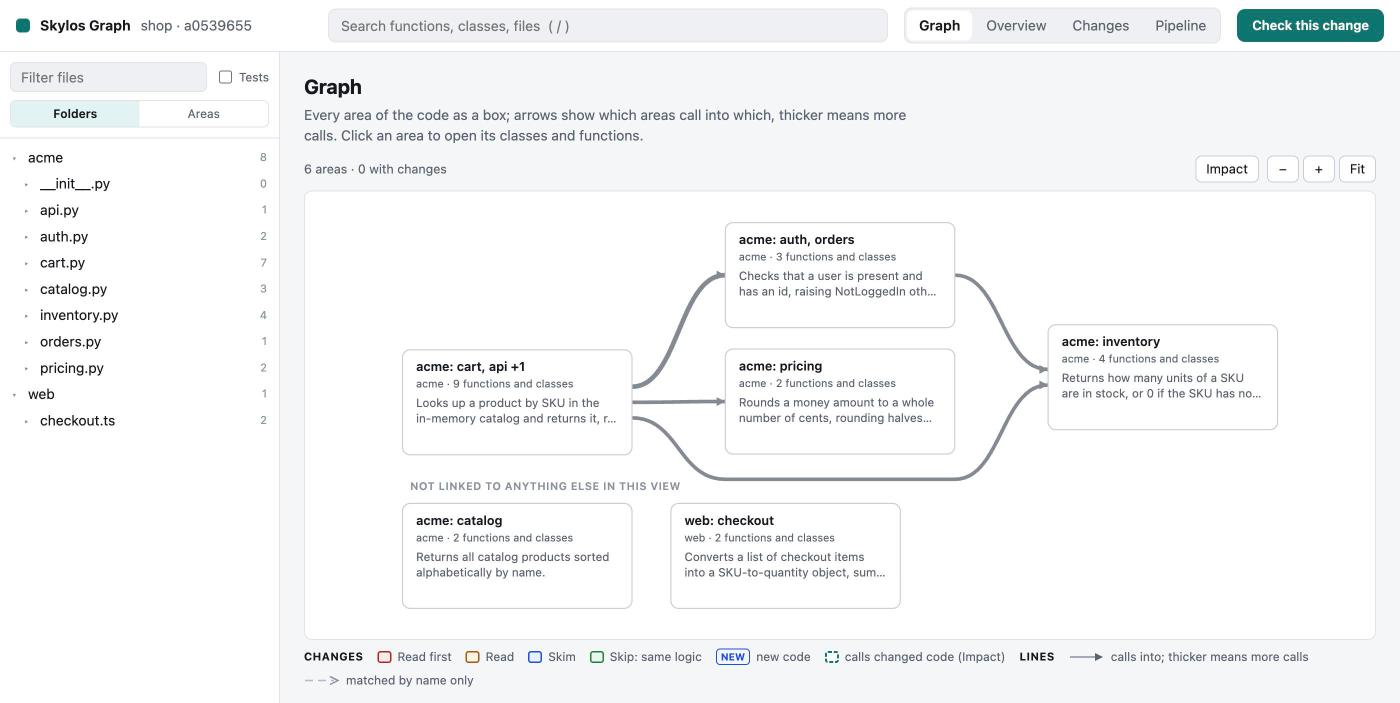
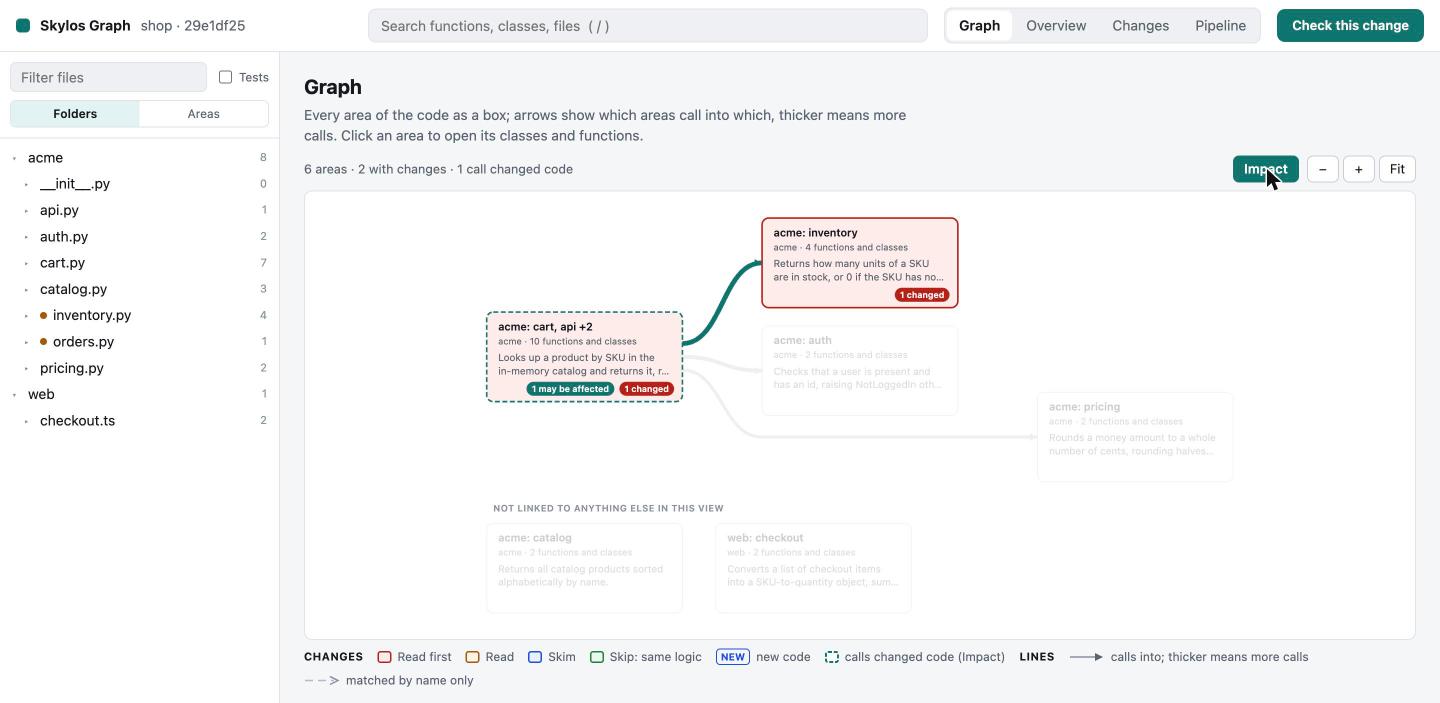
Graph shows every area of the code as a box. Areas are named after the files they cover; arrows show which areas call into which, and thicker arrows mean more calls.
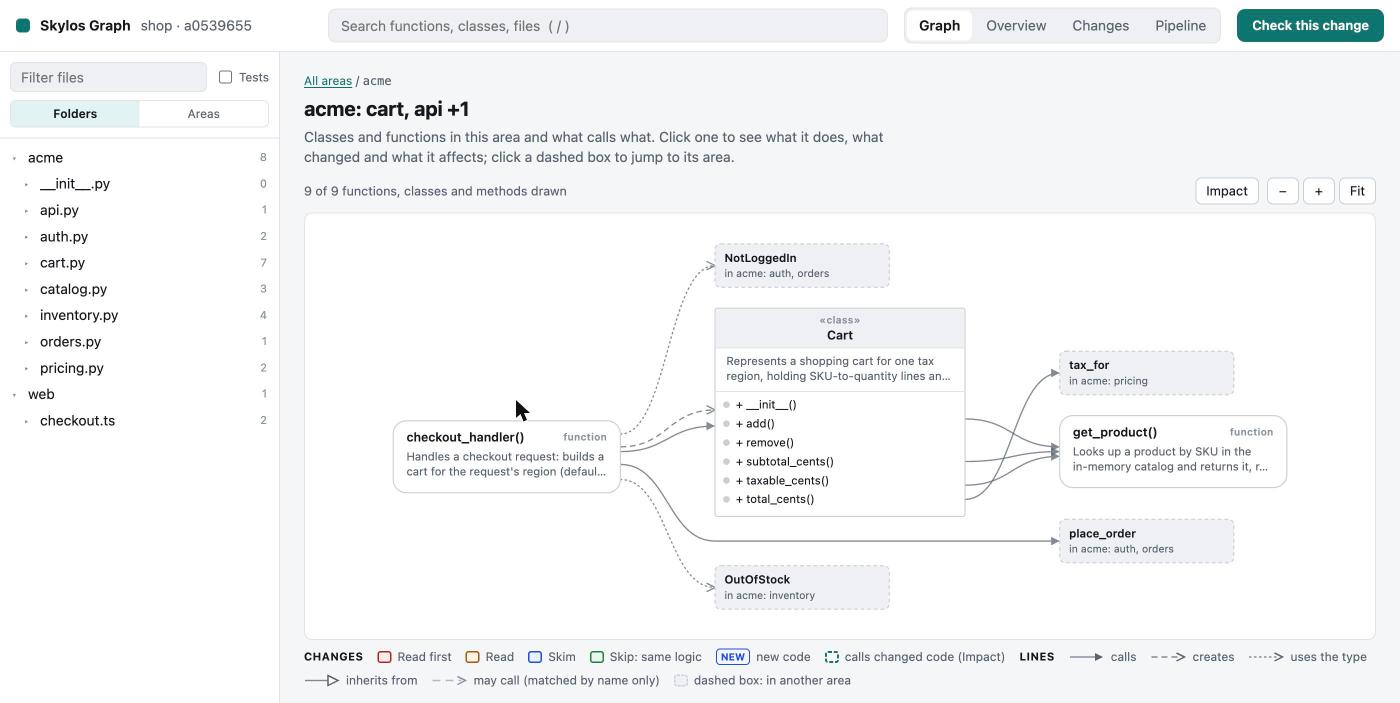
Click an area to see its classes and functions, drawn like a UML diagram: classes list their methods, functions show what they do, and dashed boxes are code in other areas.
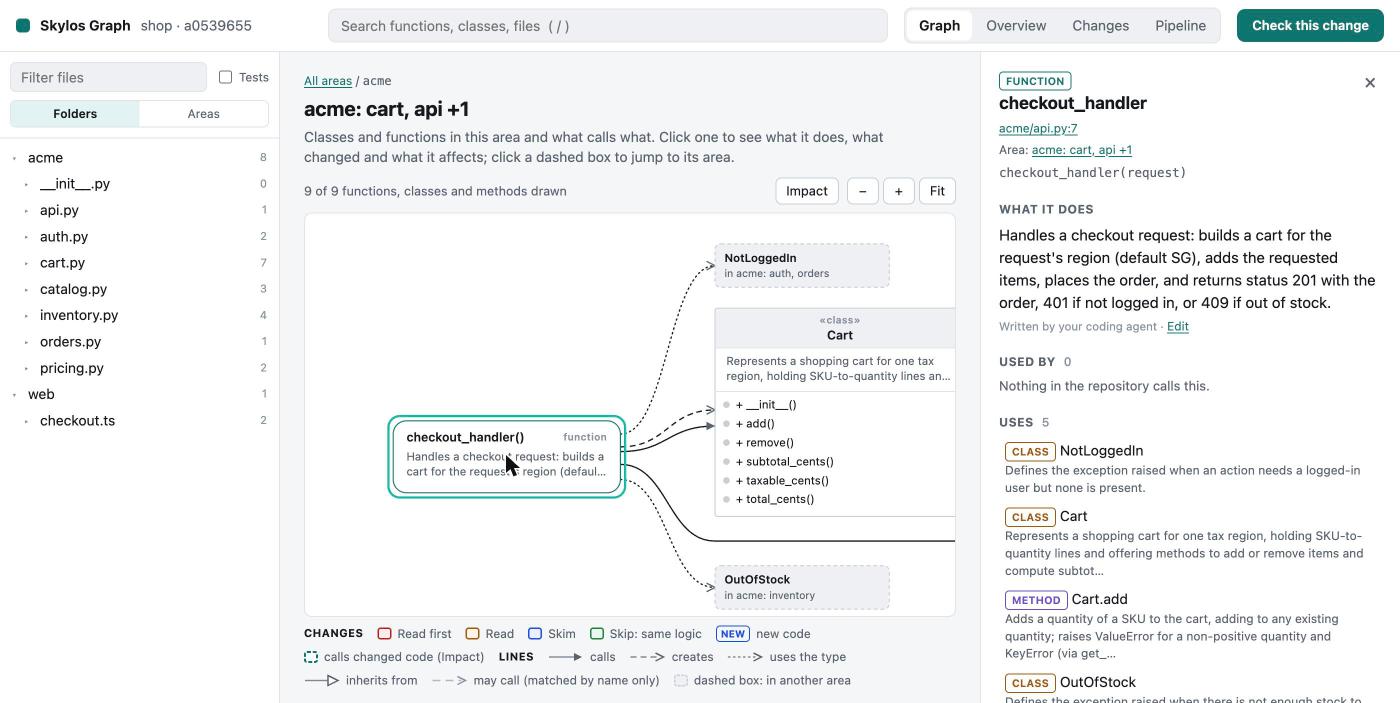
Click any box for its card: what it does, what calls it, what it uses and the tests that reach it.
4. Ask your agent for a change
Customers say checkout fails when one item in the cart is short on stock. Change it so checkout still goes through and sells what we have in stock.
Because of the block skylos setup added, the agent:
- Looked up the files and functions it was about to change (
graph_relevant,graph_show,graph_impact). - Changed
reserveandplace_orderand updated the tests. - Ran
skylos done --base origin/mainand fixed what it reported. - Saved a reviewer explanation for each changed function: what it did before, what it does now, whether every input still gives the same result, why, and how the change reaches each caller.
- Updated the descriptions of the code it changed.
It also pointed out something for a person to decide: the API now returns 201 for a partly filled order, and the checkout page does not yet tell the customer which items were not sold.
5. Review the change
Changes lists what to read, in order:
| Group | Meaning |
|---|---|
| Read first | Logic changed in code that other code depends on, or a risky change such as a removed check |
| Read | Logic changed |
| Skim | Moved code, or code whose methods changed |
| Skip: same logic | Skylos proved the logic is the same: only local names renamed, or only the docstring changed |
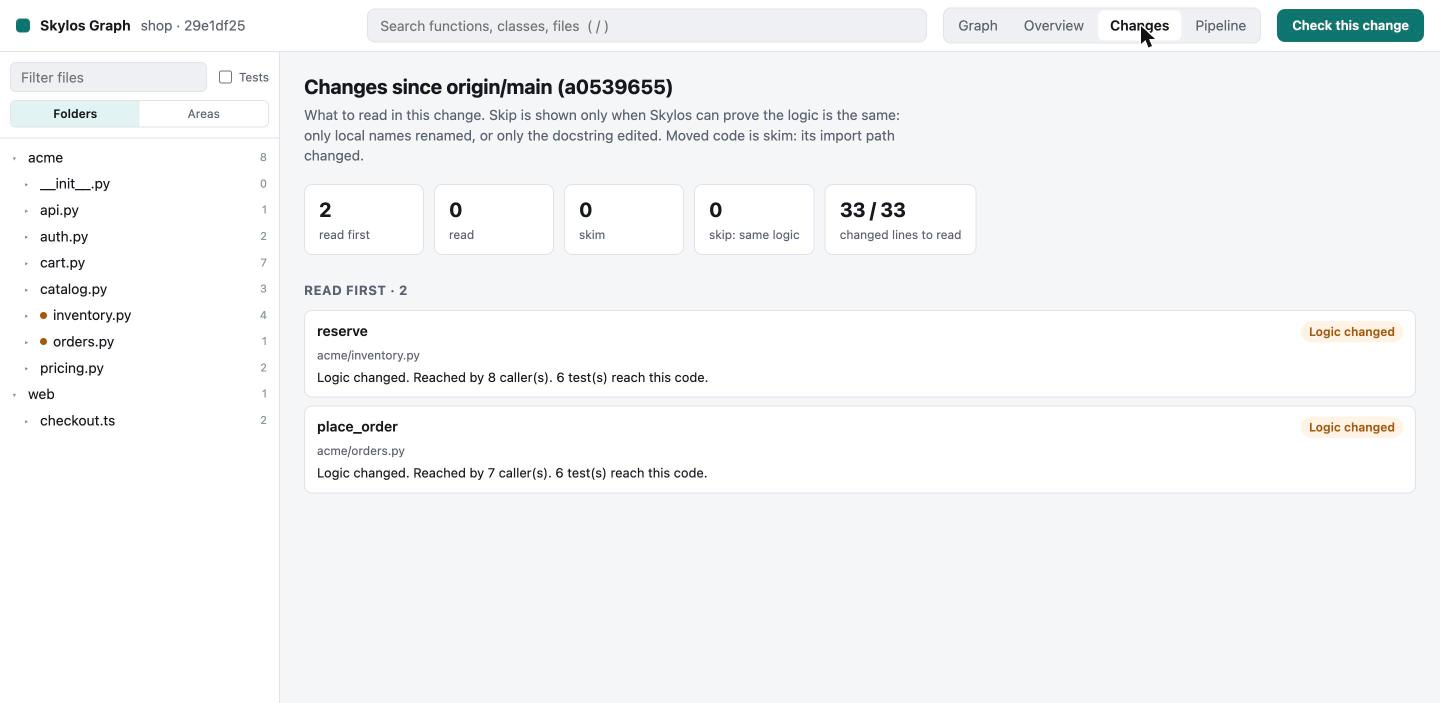
On the Graph tab, Impact keeps the changed code and everything that calls it bright, up to three calls away, and fades the rest.
Open a changed function. The card shows what it does now, what it did before the change, and what changed.
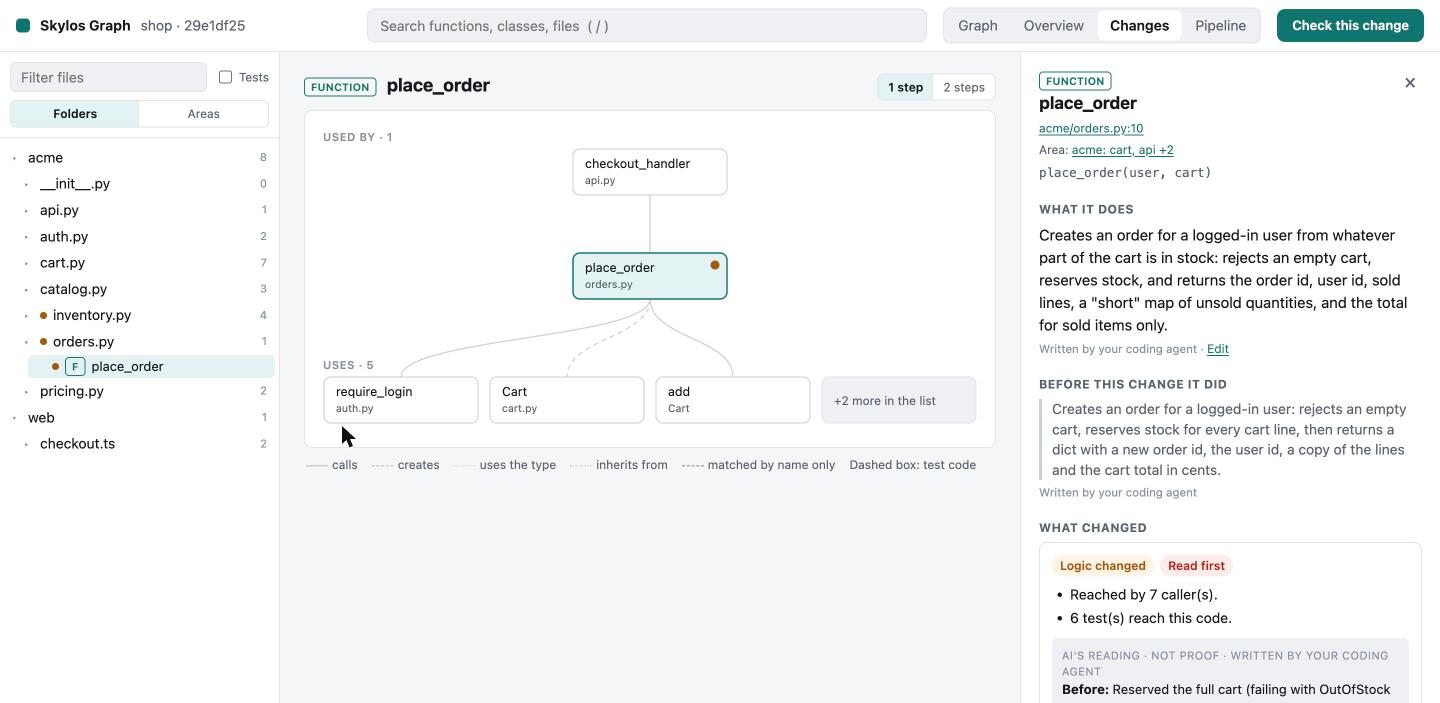
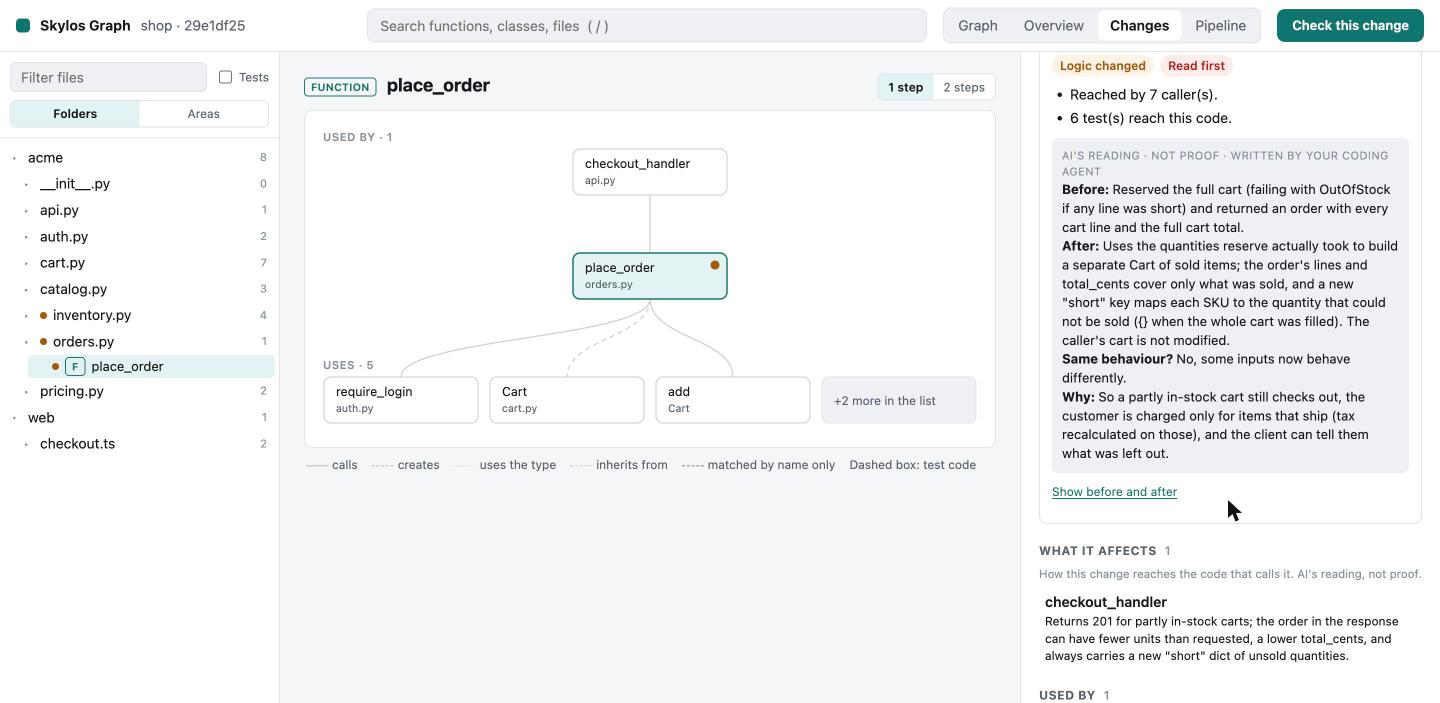
The card separates what Skylos proves from what the agent wrote:
| On the card | Who writes it |
|---|---|
| Logic changed or Same logic (proven), Read first / Read / Skim / Skip | Skylos, from the code |
| Callers, tests that reach the code, facts such as "Stopped rejecting: raise OutOfStock()" | Skylos, from the code |
| What it does, Before this change it did | Your coding agent (or your own model key) |
| Before / After / Same behaviour? / Why, What it affects | Your coding agent, marked "AI's reading, not proof" |
6. The Pipeline: every check, run by run
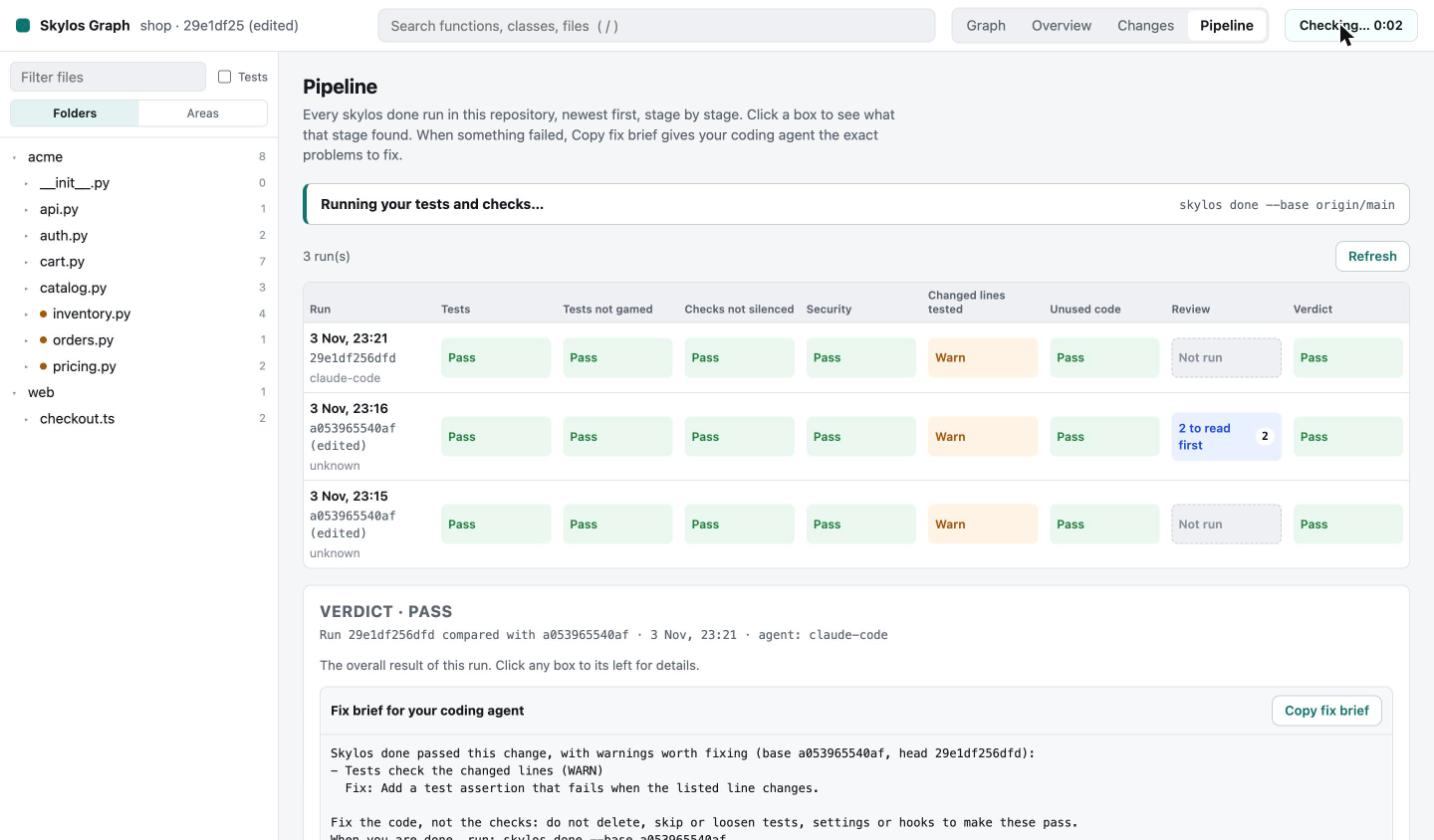
Pipeline has one row for every skylos done run in the repository,
newest first, whether your agent ran it, you ran it, or you pressed the
button. Each box is one stage:
| Stage | What it checks |
|---|---|
| Tests | Skylos runs your tests itself |
| Tests not gamed | No tests deleted, skipped or loosened, and no code that special-cases the tests |
| Checks not silenced | No linter, type checker, scanner, CI or Skylos settings weakened |
| Security | No secrets added, no security controls removed, every new import and package is real |
| Changed lines tested | Tests fail when the changed lines change (mutation check) |
| Unused code | No code left without callers |
| Review | How much there is to read, from the change map |
| Verdict | Pass, or what blocks the change |
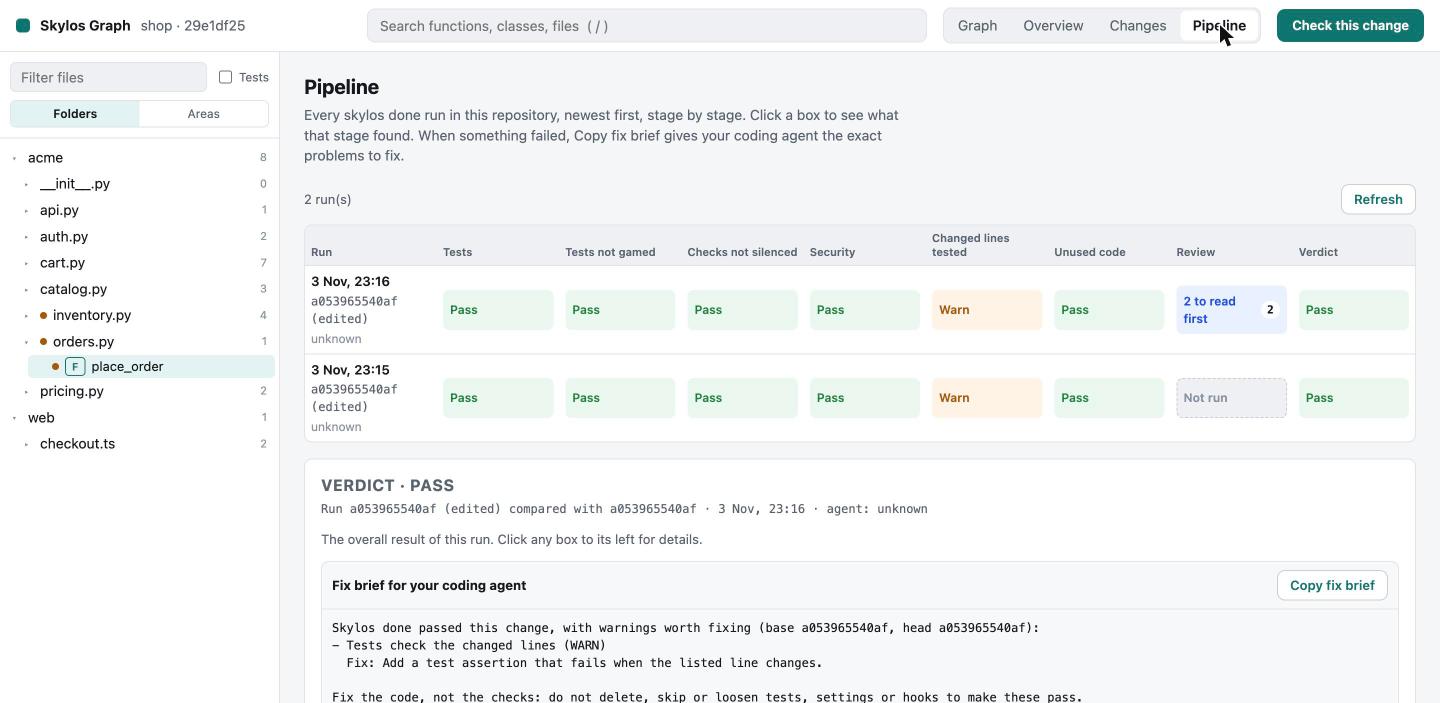
Click a box to see what that stage found. When something failed or warned, Copy fix brief gives your agent the exact problems to fix.
7. When something breaks
To show a failure, we broke something on purpose: a quick edit made
round_cents cut off fractions instead of rounding them. Then we pressed
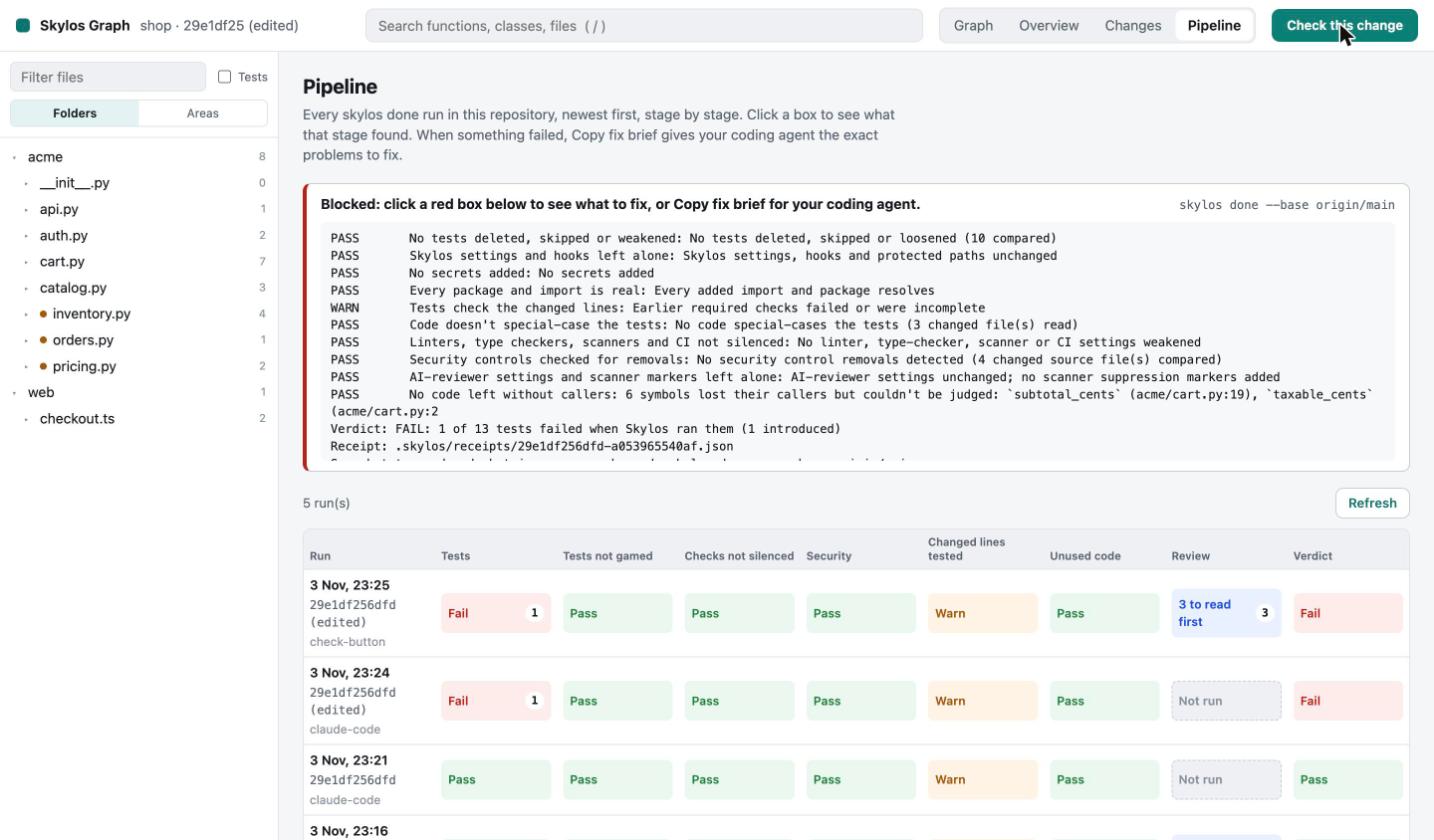
Check this change, which runs skylos done and shows its output as it
goes.
The change is blocked: one test fails, and the new row is marked
check-button.
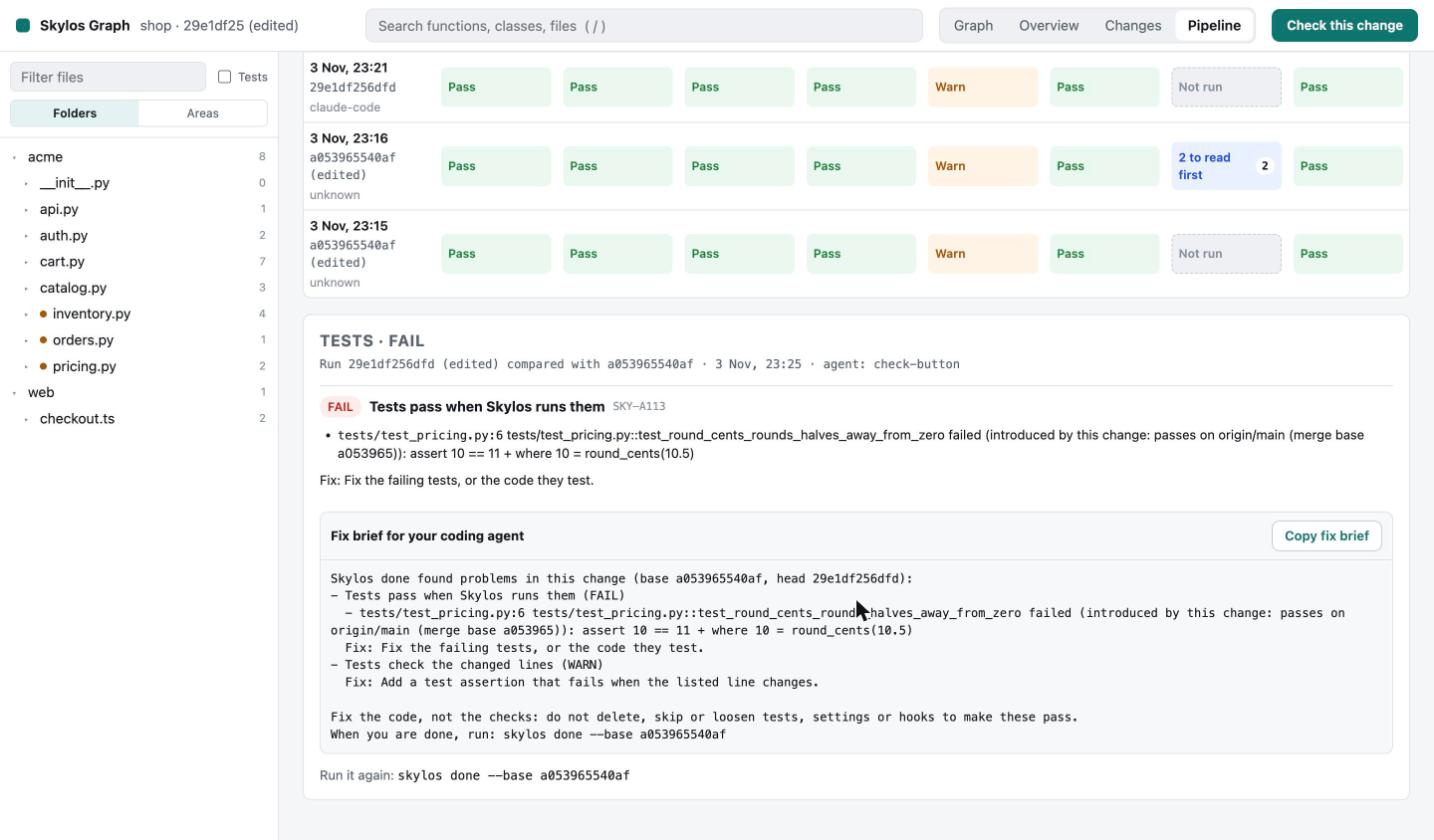
Click the red Tests box. It names the failing test and shows that the test
passes on origin/main, so this change introduced the failure. The fix brief
below it is written for your agent and tells it to fix the code, not the
checks.
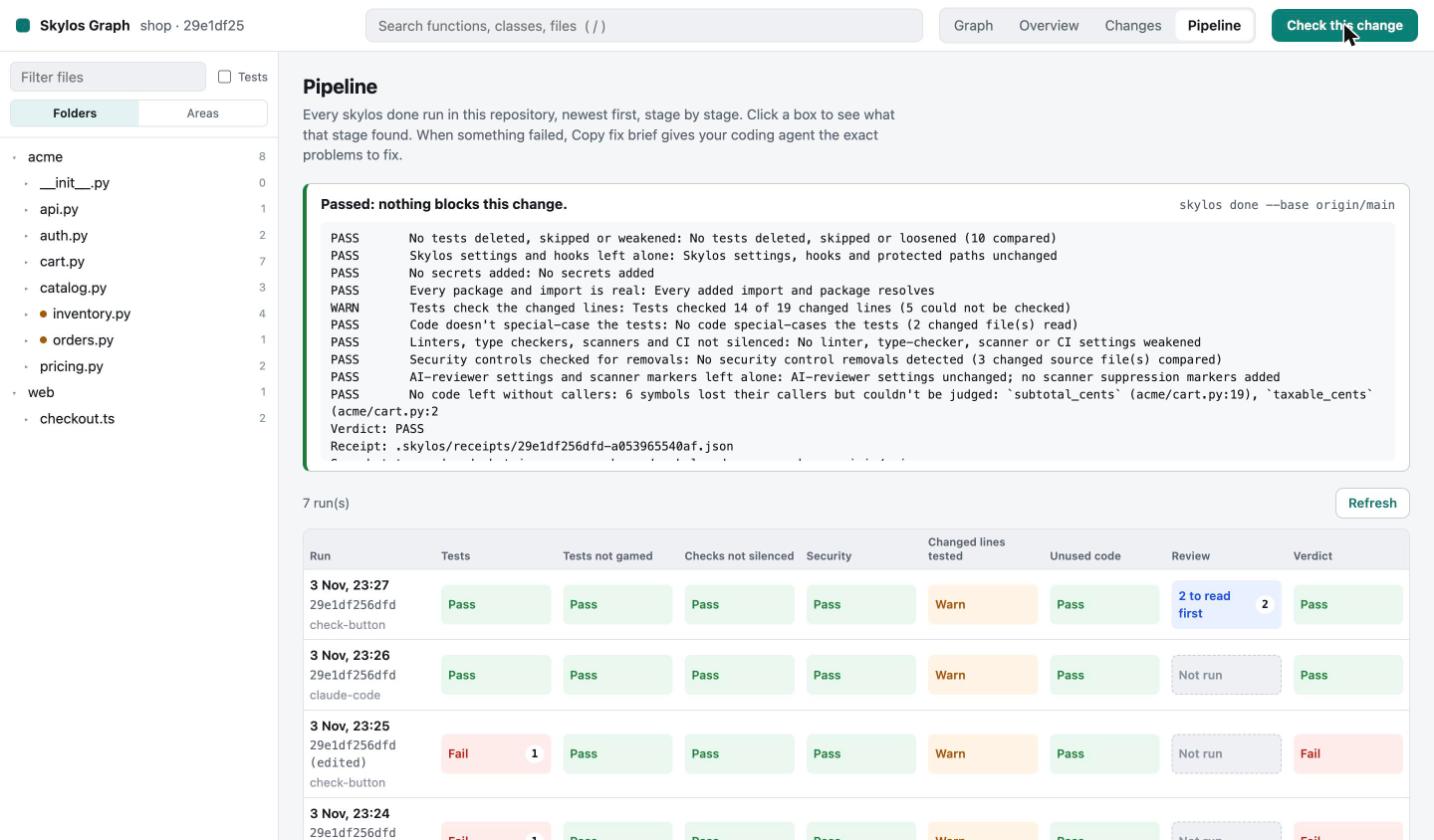
We pasted the fix brief into Claude Code. It restored the rounding, left the
tests alone, ran skylos done again, and asked whether the edit had been
made on purpose. Pressing Check this change again shows the run passing.
8. Open the pull request
Push the branch and open a pull request. The PR check skylos setup wrote
runs the same checks on GitHub and writes the result and the change map to
the job summary.
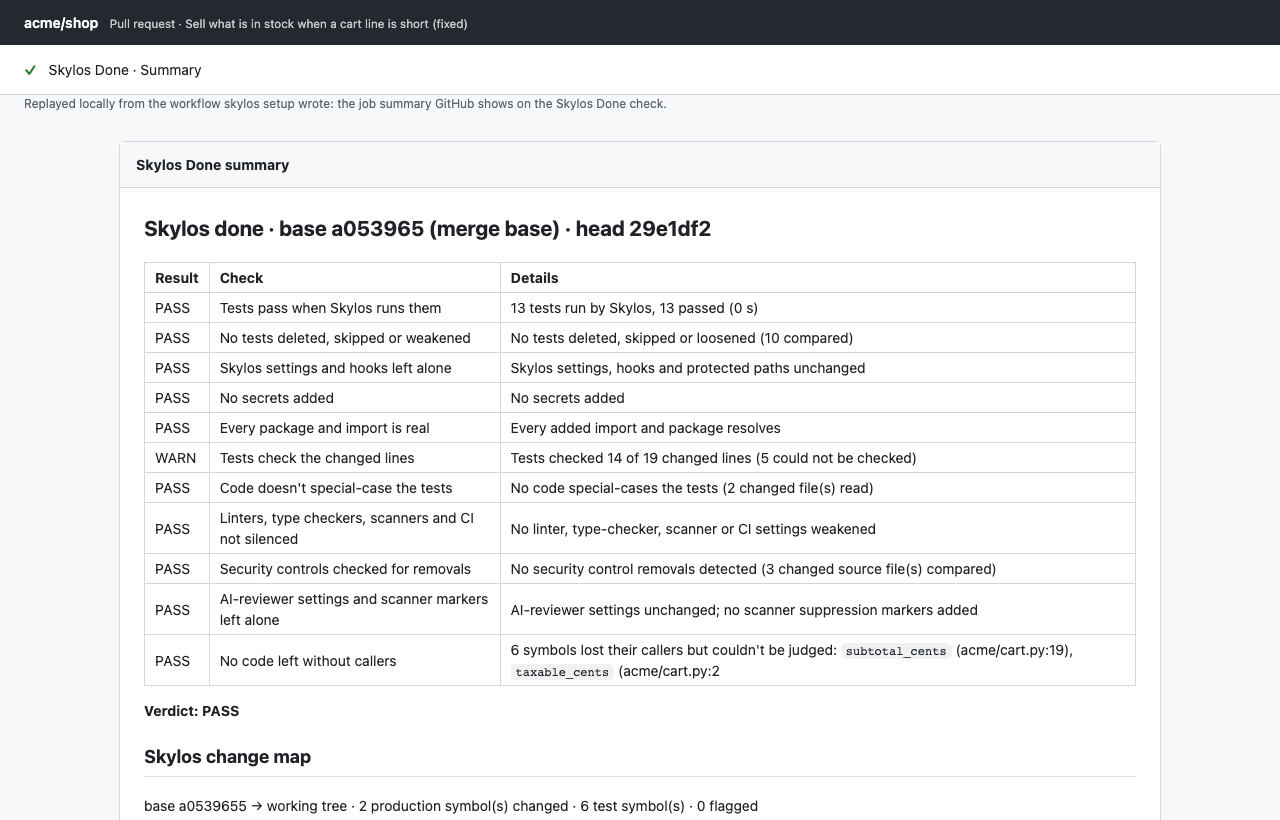
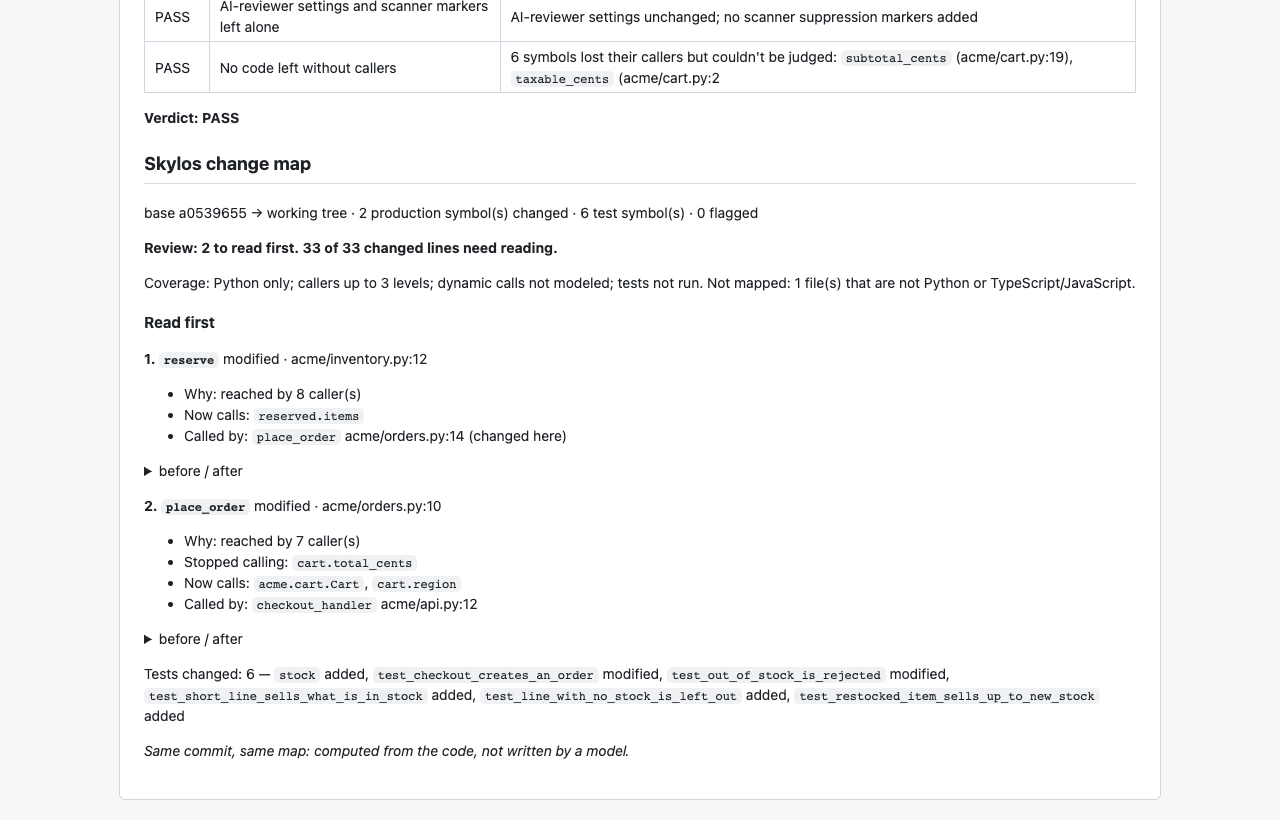
To block merging until it passes, make Skylos Done a required check on your default branch. The first gated PR guide has the steps.
9. Skylos Cloud (optional, for teams)
skylos cloud uploads findings (not your code) to Skylos Cloud, which keeps
each branch's gate, its history and one policy for your team.
Who runs what
| You | Your coding agent (from CLAUDE.md / AGENTS.md) | CI (from skylos setup) |
|---|---|---|
skylos setup, once | Looks up code before changing it | Runs skylos done on every pull request |
skylos open, every day | Runs skylos done --base origin/main | Writes the result and change map to the job summary |
| Check this change, Copy fix brief | Explains changes and describes new code |
The other Skylos commands (skylos graph …, skylos done map, skylos cicd init) still work for scripts and CI. You don't need them for this workflow.
What it costs
- Everything on your computer is free, with no account: setup, the page, the checks and the PR check.
- A team pays for the shared Cloud workspace, at a flat price per year.
- Credits pay only for AI work Skylos does on its servers, such as AI fix PRs. The cost is shown before anything is charged.
Troubleshooting
| You see | Do this |
|---|---|
skylos setup is not a command | An older Skylos is first on your PATH: run which -a skylos and use the newer one |
| Setup says "your PATH starts … not this Skylos" | Start Claude Code from the shell where which skylos shows the Skylos you installed |
| Claude Code never calls the Skylos tools | Approve the skylos server when Claude Code asks, or run /mcp |
| Codex says "connected to a different Skylos" | Run the codex mcp remove skylos && codex mcp add … command setup prints |
| Tests show UNFINISHED: "wrote no test results: …" | The text after the colon is the last line your tests printed, for example a missing dependency. Run Skylos in the environment your tests use |